Changelog

Follow up on some of the latest improvements and updates on the Collective Data platform. 

Quartermaster: Item Request and Report Updates

We’ve made a couple updates to the Item Request process and Issuance Reports.

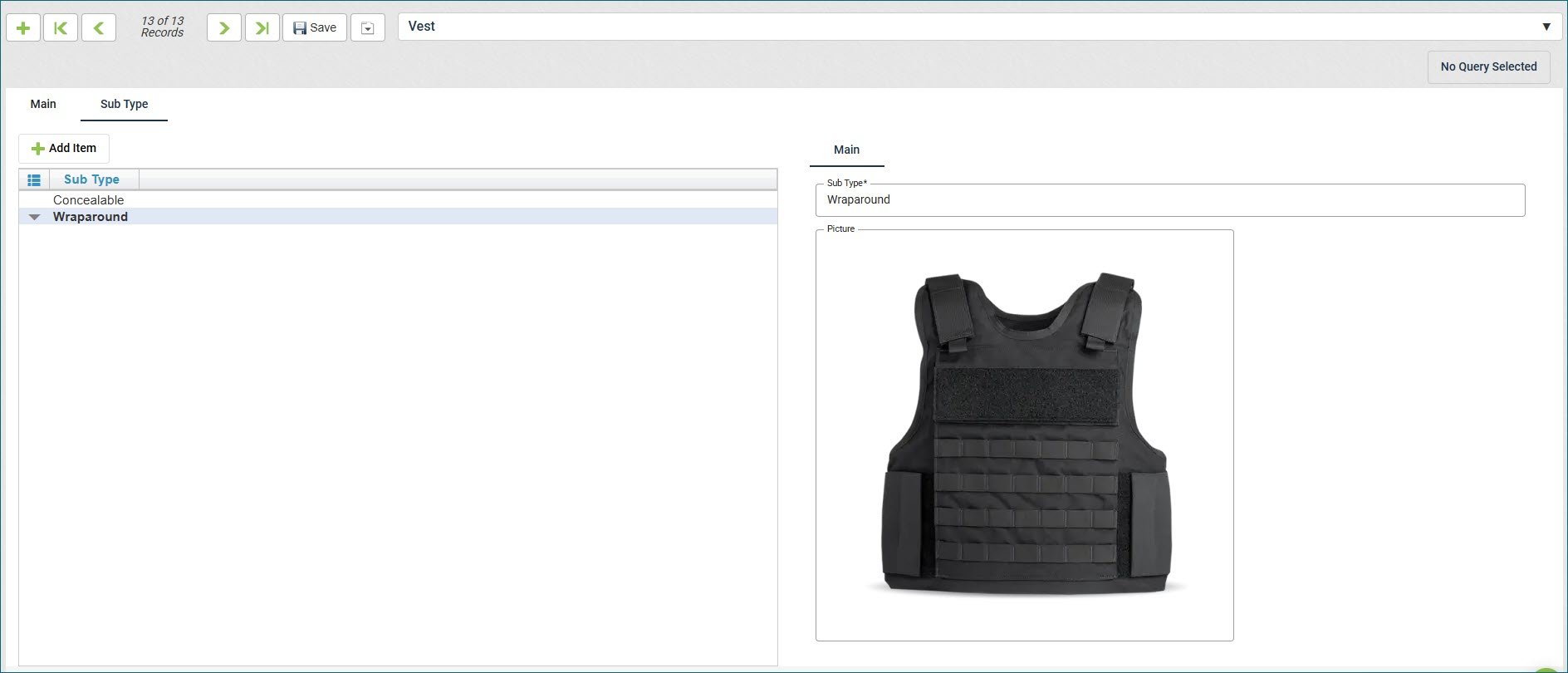
First, we’ve created an email notification that can be enabled to allow the Item Requestor to receive an email about their request, and a link is included in the email so they can keep track of their request easier.

We also made an update to the Employee Receipt of Item Received report. This now incorporates Color, Size, and Item Styles information.

Fleet: Work Order Reports – Inspection Updates

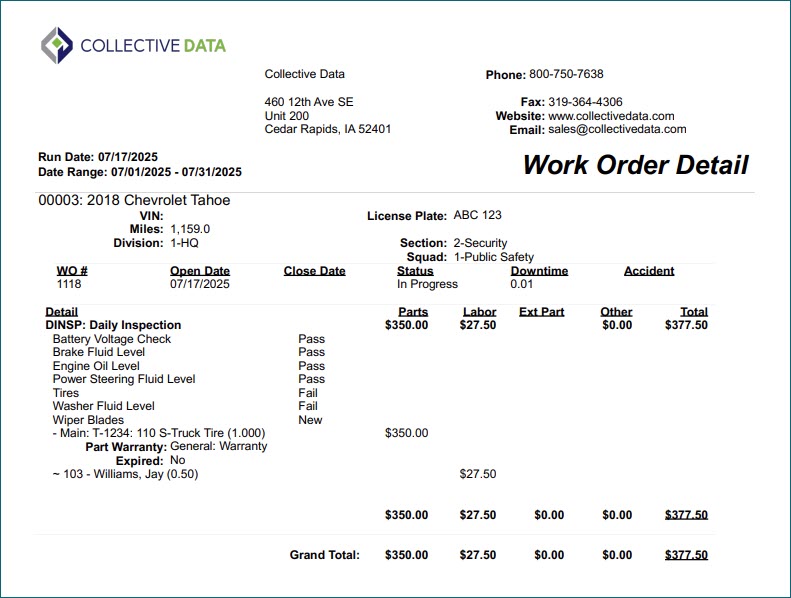
The Work Order Detail and Work Order History reports now support displaying Inspection details when a Work Order includes an Inspection work code. To view this information, simply check the “Show Inspection Details” option in the report settings in the Report Selector view.

Inventory Distribution Warehouse

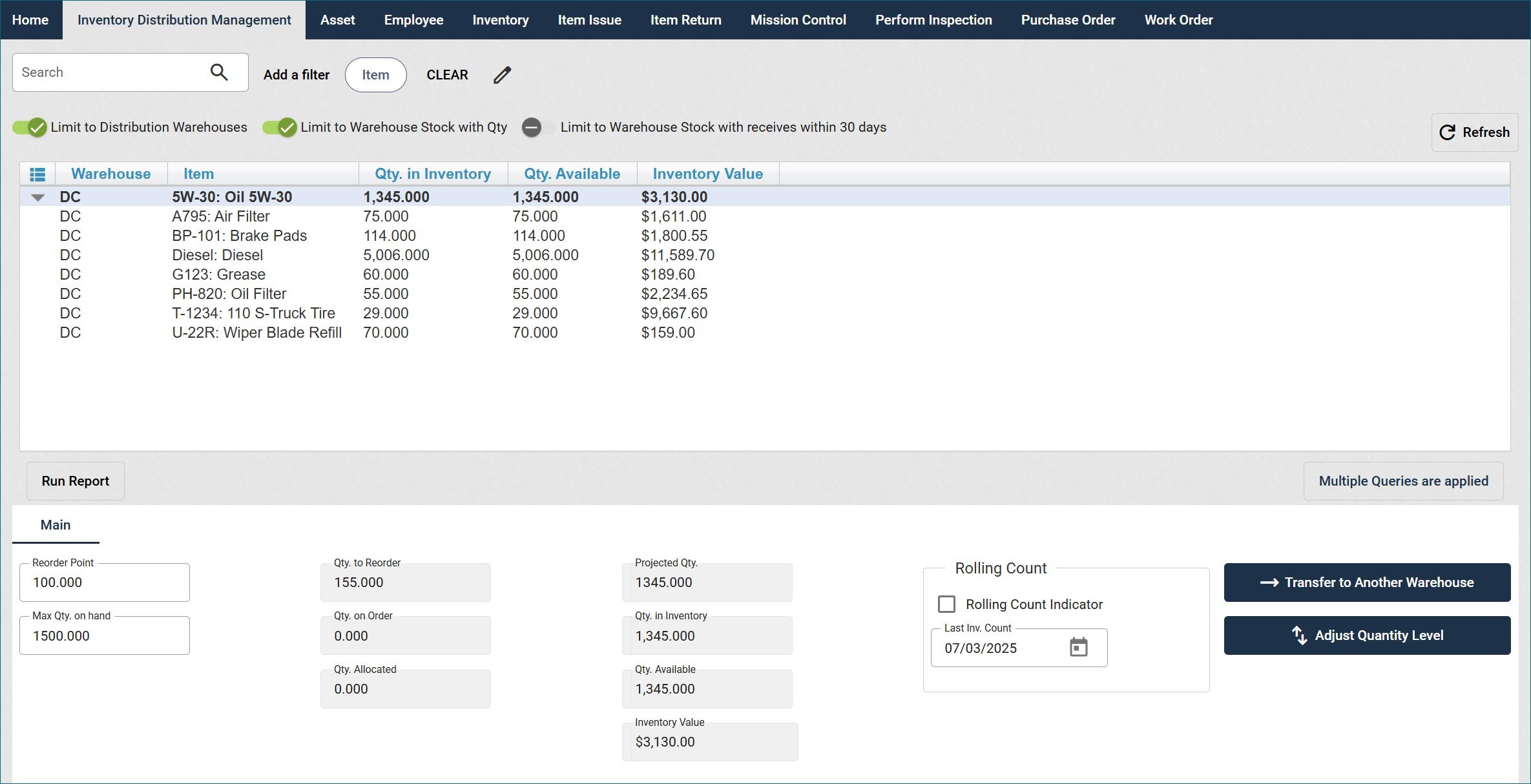
We’ve added support for Distribution Centers (DCs) to help streamline inventory storage and movement. DCs act as centralized hubs where you can store items before distributing them to individual warehouses or locations. These locations are meant solely for holding and transferring inventory—items stored in a DC cannot be issued to employees or used on Work Orders until they are transferred to a regular warehouse.

You can add inventory to a DC manually or through an import, and Purchase Orders can now be received directly into a DC. A new Inventory Distribution Management view makes it easy to manage transfers between warehouses, with options for both general transfers and specific bucket-based transfers. You can also view detailed inventory levels, allocations, reorder settings, and more.

Auto-Incrementing Asset Numbers

You can now set assets to use auto-incrementing numeric asset numbers for easier and more consistent tracking if you do not have specific numbers to use. Simply enable this in Organization Settings and set your starting number. This feature only works with numerals; you cannot use letters or special characters such as dashes or decimal points.

Preventative Maintenance Thresholds for Work Orders

We’re excited to introduce a new level of flexibility for your Preventative Maintenance scheduling.

Now, you have the power to define exactly when you’d like PM services to start appearing on Work Orders – before they’re due. Set your preferred threshold in days or meters, and ensure your team gets a head start on upcoming maintenance.

Prefer the current setup? No problem. If thresholds aren’t set, your system will continue to function as usual, prompting your shop to add services only when they’re due or overdue.

It’s your maintenance – your way.

Improved Recalls Functionality

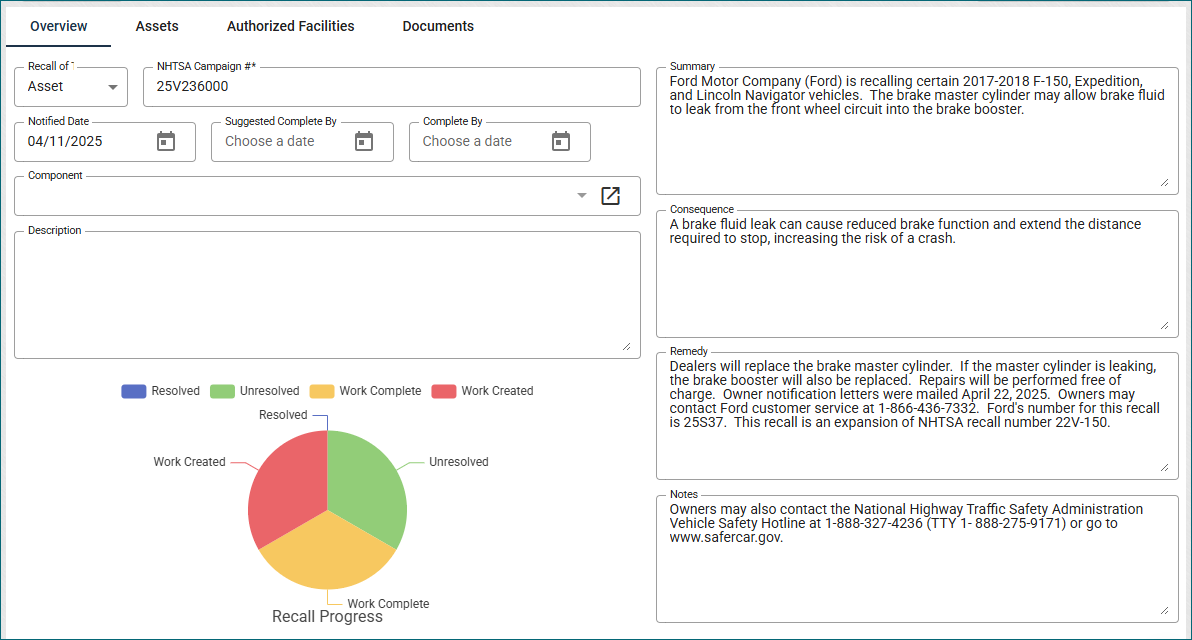
Our Recalls feature has been updated with a new visual enhancement to help you better manage recall progress. A completion graph is now displayed in the Recalls view, providing a quick overview of how many vehicles still require attention.

You can easily manage vehicles within a recall by:

  • Adding vehicles to work orders or maintenance requests directly from the Recalls view.
  • Removing vehicles that no longer apply to the recall.

These actions help streamline the recall resolution process and ensure accurate tracking.

As a reminder, Collective Data integrates with the National Highway Traffic Safety Administration (NHTSA) to automatically import recall data into your application. This integration is included with your standard fleet functionality! No additional modules are required.

Fleet Health Report

We are excited to announce a new report available for Fleet, called Fleet Health. This report aims to give fleet managers clarity, control, and foresight by turning raw fleet data into meaningful insights supporting smarter maintenance planning, reduced downtime, and cost optimization across the fleet.

With this report, you’ll be able to:

  • Identify at-risk vehicles – determined by factors such as overdue services, unplanned repairs, and maintenance cost ratios.
  • Depreciation information – see your capital costs and depreciation values
  • Work and Inspections performed – see at a glance how many work orders were performed for a vehicle over a year, inspections, upcoming scheduled services and PM compliance.

A cover page is also available for this report that gives a quick overview of the totals included in the report.


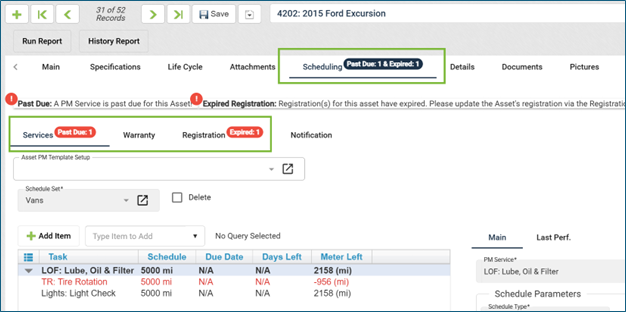
Fleet: Scheduling Tab Badge Update

The badges on the Asset View → Scheduling tab have been updated to give even more information on what items are past due, so you can see at a glance what needs to be taken care of for your vehicle. Now, it takes into account expired registrations and will give the total number of expired services.

Shop Module: Shop Scheduler Updates

We’re excited to announce new enhancements to the Shop Scheduler, available exclusively in the Shop Module. This feature empowers drivers to schedule services or repairs with your shop, helping you better manage appointments and daily workflows. Here’s what we have added:

  • Time Blocking: Block off entire days or specific parts of the day to better control availability.
  • Time-Specific Services: Set certain work requests—like oil changes—to only be available during designated time slots (e.g., mornings only).
  • Work Code Integration: Assign exact work codes during scheduling, which will automatically carry over to the Work Order upon creation.
  • Improved Limited User Experience
    • Drivers can now view additional service details provided by the shop.
    • Appointment times are now selected via a dropdown, improving usability—especially on mobile devices.
    • Optional comment field for drivers when booking.
    • A new Service History tab allows drivers to reschedule or cancel appointments if needed.

Employee Self-Auditing

Limited Users can now easily confirm or deny possession of their issued items directly from the Issued Items tab. This self-audit option provides a quick way to track item accountability without using the Inspection Management view. Once enabled in Organization Settings, users will see Confirm and Deny buttons next to each item, with color-coded status and timestamps. Optional email reminders can also be set up to prompt employees to complete their self-audits.

June 2026

Our June Release is here! General Updates Live Reports The Reports experience has been refreshed! Navigating to Reports in the left-hand menu now displays all available reports in a side panel, where you can filter, group, and set date ranges, all on a single screen. Click Run Report and results load right there; no more bouncing between pages to adjust your selections.A new Grid view option is available as well, which helps improve data layout on some reports in the Reports view.Dates are easier to select too, with a larger display and buttons.Your Favorite reports and custom reports are still…

April 2026

Our April Release is here! General Updates Inspections: Required ImagesImages can now be required separately from notes on inspections. Any current inspections in your application will not have any user experience changes, but you can manually update them if desired. Please see the Inspection topic in the User Guide for more information. Warehouse Inactivation + Available Quantity We’ve updated the workflow to prevent a warehouse from being inactivated while it still contains active inventory. All active inventory must be transferred to another active warehouse before the warehouse can be inactivated.Purchase Order Calculation UpdateWe identified and resolved an issue where, in…

March 2026

Our March Release is here! General Updates Work Order Documents We added linkage between the Work Order Documents and Asset Documents. Now, when a Work Order has documents added to it, you can now see those documents in that Asset’s documents tab, and it will be labeled which Work Order they are from.  Inspection Management  We added a date filtering option to the Inspection Management view – now you can filter your inspections to the last 30 or 60 days, or show all. Quick Search field  We changed the Search field at the top of the view to be renamed the Quick Filter field, which is more accurate for…

February 2026

Our February Release is here! General Updates Collapsible Side Navigation for a Larger WorkspaceYou can now collapse the side navigation to create more space in your application workspace! Click the arrows at the top of the navigation panel to collapse it into an icon-only view. Hover over the icons to quickly access the views you need. Click the arrows again to expand the full navigation menu.Work Order – Documents & PicturesThe Documents and Pictures sections on the Work Order view have been moved to tabs at the top of the screen instead of as buttons in the middle. This makes it easier to…