
Changelog

Follow up on some of the latest improvements and updates on the Collective Data platform. 

Accessibility Enhancements

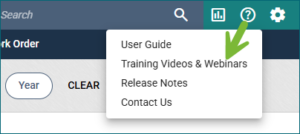
We’ve added accessibility enhancements to buttons throughout the application. Now, when hovering over elements like the Reports or Question Mark icons in the top row, as well as filters, buttons, and other interactive items within views, an explanation of each button will be displayed.

Fleet: Tracking Tires Upgrade

We’ve made enhancements to how tires can be used and tracked in the application. The Wheel Configuration view allows defining tire setups for asset types, enabling bulk replacements in Work Orders. When using a Tire Service work code, a Tire Details tab appears with options to Replace All Tires, Rotate Tires, Repair Tires, or Replace Tires. Tracking serial numbers, DOT number logging, and history of tire treads and PSI enhance tire management.


Shop: Supervisor View

We added two additional statuses that are now available on the Supervisor View.

  • At Vendor: Allows you to see work orders that are in an At Vendor status
  • Clocked in: Allows you to see work orders that have a technician currently clocked in to a work code on it. This status only works if your shop uses the “Clock In/Clock Out” feature for work codes.

Quartermaster: Default Queries for Item Issue/Return

The Item Issue, Item Return, and Single Item Issue views now include a Last 30 Days query to improve performance by limiting the number of loaded records. To find older records, simply remove the query.

Quartermaster: Serializing Inventory on Receive

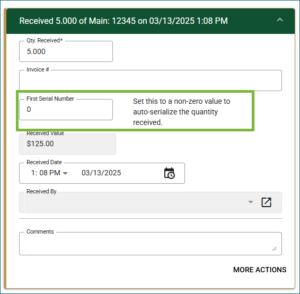
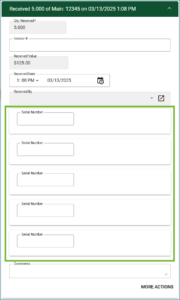
You can now serialize inventory when receiving items through Purchase Orders!

These serial numbers can either be set to auto-increment after the first one entered, or you can enter them manually.

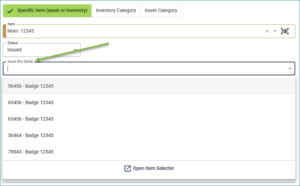
Once an item is serialized, you can assign its specific serial number to an employee.

Ellipsis Icon Change

To better align with industry standards, the ellipsis icon located on fields has been replaced with a pop-out icon. It will now be referred to as the “Go To” icon, while maintaining all existing functionality.


Quartermaster: Employee Inspection Updates

We’ve made some key updates to Employee Inspections to improve efficiency and accuracy:

View Issued Inventory Quantities – The Perform Inspection view now displays the quantities of issued inventory, so you can easily see how many items an employee should have.

Quickly Add Issued Items to Inspections – Creating inspections for issued items is now easier than ever. With just one click, all issued inventory items will automatically be included in the employee’s inspection.

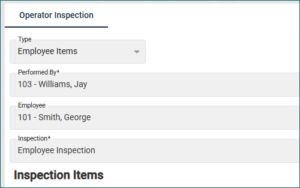
New “Performed by” Option – Employee Inspections now support a “Performed by” field, allowing you to specify who conducted the inspection. This means you can track both the inspecting employee and the inspected employee within the Inspection Management view.

These enhancements streamline the inspection process, ensuring greater accuracy and ease of use.

Fleet: Additional VIN Decoding Options

Collective Data is proud to offer VIN Decoding for assets, automatically populating key fields in the application with data sourced directly from the National Highway Traffic Safety Administration (NHTSA) VIN Decoder. If an invalid VIN is detected, a warning message from NHTSA will be available by clicking the button next to the VIN field.

We’ve recently expanded this feature to include even more details! Now, if the information is available in NHTSA, it can be seamlessly imported into our application. Here are all the fields that can be brought in:

  • Year
  • Asset Make/Model
  • Asset Type/Subtype
  • Engine Manufacturer
  • Engine Model
  • Engine HP
  • Fuel Type
  • Gross Vehicle Weight Rating (GVWR)

Enjoy more comprehensive asset details with this enhanced VIN Decoding update!

Fleet: Asset Registration Import

We now have an Asset Registration Import! No more manually entering in, one by one, when multiple vehicles had their registrations updated; you can simply import these in via the import process! This also works to get initial registrations for your fleet in. If this isn’t something you’ve been tracking, now is the perfect time to start!

Quartermaster: Inventory Catalog Book

We’re excited to introduce the Inventory Catalog Book, complementing the Asset Catalog Book released in November!

This new feature allows you to print a catalog of your inventory, complete with corresponding barcodes, making scanning easier and more efficient.

April 2026

Our April Release is here!

General Updates Inspections: Required ImagesImages can now be required separately from notes on inspections. Any current inspections in your application will not have any user experience changes, but you can manually update them if desired. Please see the Inspection topic in the User Guide for more information. Warehouse Inactivation + Available Quantity We’ve updated the workflow to prevent a warehouse from being inactivated while it still contains active inventory. All active inventory must be transferred to another active warehouse before the warehouse can be inactivated.Purchase Order Calculation UpdateWe identified and resolved an issue where, in certain cases,…

March 2026

Our March Release is here!

General Updates Work Order Documents We added linkage between the Work Order Documents and Asset Documents. Now, when a Work Order has documents added to it, you can now see those documents in that Asset’s documents tab, and it will be labeled which Work Order they are from.  Inspection Management  We added a date filtering option to the Inspection Management view – now you can filter your inspections to the last 30 or 60 days, or show all. Quick Search field  We changed the Search field at the top of the view to be renamed the Quick Filter field, which is more accurate for the type…

February 2026

Our February Release is here!

General Updates Collapsible Side Navigation for a Larger WorkspaceYou can now collapse the side navigation to create more space in your application workspace! Click the arrows at the top of the navigation panel to collapse it into an icon-only view. Hover over the icons to quickly access the views you need. Click the arrows again to expand the full navigation menu.Work Order – Documents & PicturesThe Documents and Pictures sections on the Work Order view have been moved to tabs at the top of the screen instead of as buttons in the middle. This makes it easier to see when…

December 2025 Updates

Our December Release is here! 

For any questions or to schedule an update, please reach out to your Client Success Coordinator by clicking here. 

General Updates Auto-Incrementing Inventory Numbers You can now set Inventory to use auto-incrementing numeric inventory numbers for easier and more consistent tracking if you do not have specific numbers you want to use. This works the same as the auto-incrementing asset numbers feature. For information on how to use this feature, check the User Guide under the Inventory topic. Admin – Idle and Absolute Timeouts We added controls on the Admin page to manage idle and absolute session timeouts. These settings are available separately for regular users and kiosk users. Idle timeout: If you are idle (hands…